
Capture Section Of Screen Software v7.0
![[Nog geen beoordelingen van gebruikers]](https://cdn.afterdawn.fi/v4/download/rating_0_0.gif)
Commercial demo
Vista / Win7 / Win8 / WinXP
Vista / Win7 / Win8 / WinXP
Capture Section Of Screen Software can grab a picture of a section of your screen.
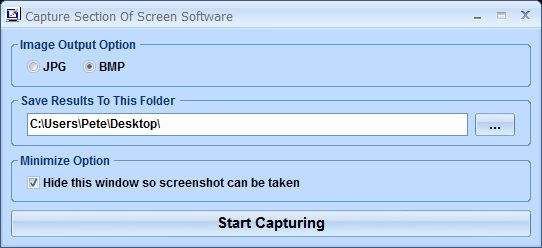
You simply choose the format (JPG or BMP) and the folder for saving the image. One click on the Start Capturing button turns the mouse pointer into an area selection tool.
Simply move the cross to one corner of the area you want to capture, hold down the left mouse button and drag open the selection rectangle to cover the area you want. When you release the mouse button, the image of that screen area is automatically saved.
You simply choose the format (JPG or BMP) and the folder for saving the image. One click on the Start Capturing button turns the mouse pointer into an area selection tool.
Simply move the cross to one corner of the area you want to capture, hold down the left mouse button and drag open the selection rectangle to cover the area you want. When you release the mouse button, the image of that screen area is automatically saved.
Screenshots:
HTML code om naar deze pagina te linken:
Licentietype
Commercial demo1
Auteurs homepage
Bezoek de website van de auteur
Datum waarop toegevoegd
23 Nov 2016
Downloads
0
Bestandsgrootte
3.05 MB
(<1min @ 1Mbps)
Ondersteunde talen
Engels
Besturingssystemen
Vista / Win7 / Win8 / WinXP1
1De licentie en de besturingssysteem informatie is gebaseerd op de laatste versie van de software.
Nog geen beoordelingen van gebruikers

